Company oversight
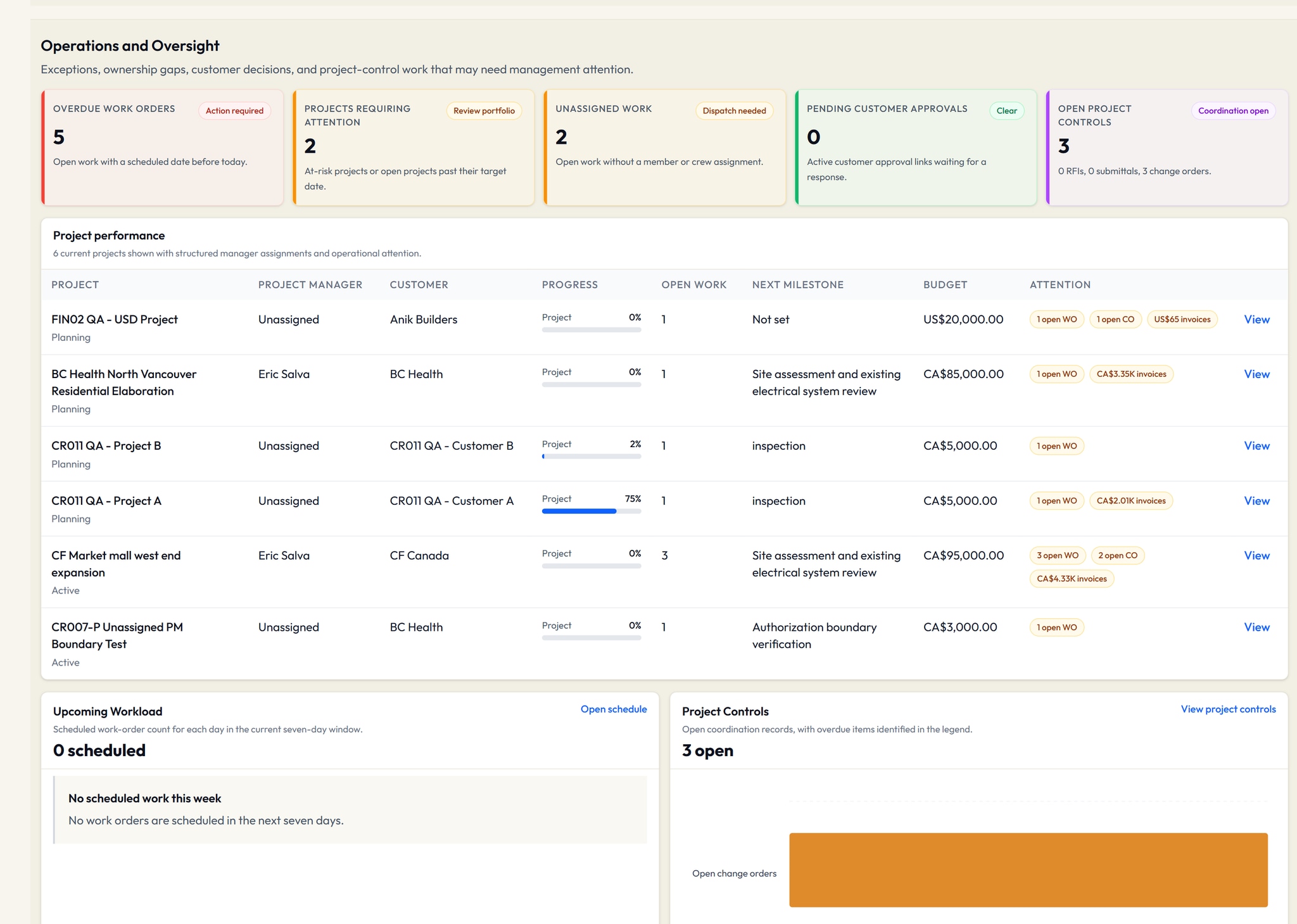
Review project attention, open work, workload and commercial summaries from current company records.
Company-wide financial visibility belongs to Owner and Admin roles.
Owner, Admin. Actions follow role and assignment.
Electrical contractor operations software
From the first estimate to the work in the field, keep the customer, project and commercial record connected.
The office coordinates the work. Project managers follow assigned projects. Technicians work from their assignments. Customers see supported records published to them.
01 / Operations
Bring customer records, project context and work orders into the same operating view.
Review project attention, open work, workload and commercial summaries from current company records.
Company-wide financial visibility belongs to Owner and Admin roles.
Owner, Admin. Actions follow role and assignment.
Keep project context, milestones and linked work together, with a focused workspace for assigned project managers.
Project managers see assigned projects, not company-wide financial management.
Owner, Admin, Project Manager. Actions follow role and assignment.
Maintain customer contacts and connect their projects, work orders and commercial documents.
Customer record administration is separate from customer account access.
Owner, Admin. Actions follow role and assignment.
Carry job context, assignment and execution status from office planning into field work.
Available actions depend on role, assignment and the work order's current state.
Owner, Admin, Project Manager, Technician. Actions follow role and assignment.
02 / Project controls
Give supporting records a place in the job, with clear responsibility and tracked status.
Record project questions, responses and status with the related customer, project and drawing context.
Teams manage responses and status; this is not an automated review service.
Owner, Admin, Project Manager. Actions follow role and assignment.
Document scope changes and line-item amounts. Convert an approved change order into a linked draft invoice.
Commercial controls remain with Owner and Admin roles. No job-cost accounting is implied.
Owner, Admin. Actions follow role and assignment.
Track submittal records, status and project context, with supported document sharing and publication.
Status is managed by the team, not an automated submittal-package engine.
Owner, Admin, Project Manager. Actions follow role and assignment.
03 / Commercial
Keep priced scope, customer decisions and invoice context connected without treating operational software as an accounting ledger.
Prepare line-item estimates, share controlled approval links and move approved scope into linked work or an invoice.
Approval records are not a claim of formal electronic-signature certification.
Owner, Admin. Actions follow role and assignment.
Maintain invoice documents and recorded payment evidence alongside the customer and project.
VolteraForge does not collect customer payments or replace your accounting ledger.
Owner, Admin. Actions follow role and assignment.
Keep agreement dates and service context with the customer, and create linked service work when it is needed.
Work creation is explicit. Automatic recurring billing is not included.
Owner, Admin. Actions follow role and assignment.
Keep document currency, tax treatment and totals with estimates and invoices as work moves forward.
Document-level currency is not foreign-exchange conversion. Tax settings do not replace professional advice.
Owner, Admin. Actions follow role and assignment.
04 / Field work
Coordinate the office schedule and crew assignment while technicians focus on the work that is theirs.
Set work timing, assign a member or crew and follow dispatch state against the same work order.
Dispatch is a management workflow, not GPS tracking or route optimization.
Owner, Admin, Project Manager, Technician. Actions follow role and assignment.
Give technicians their assigned work, job context and permitted execution updates in a focused workspace.
No time tracking, photo workflow or field checklist is included.
Owner, Admin, Project Manager, Technician. Actions follow role and assignment.
05 / Customer & drawings
Separate customer access from internal contractor work, with controlled publication and drawing access.
Publish supported records into a separate customer account while keeping internal contractor work private.
Customers see only what is published to their account. Owner and Admin roles manage access.
Owner, Admin. Actions follow role and assignment.
Start customer and project conversations from the contractor workspace; customers reply from their own active accounts.
Customer-started threads and message attachments are not included.
Owner, Admin, Project Manager. Actions follow role and assignment.
Keep drawing files and revision context with the project. Published customer files pass authorization and lifecycle checks before opening.
Access depends on role, assignment, publication and file security state.
Owner, Admin, Project Manager, Technician. Actions follow role and assignment.
06 / Insights & documents
Use current summaries, supported exports and drawing sources to inform the next decision.
Review current operating and commercial records, with supported management and operations PDF summaries.
Reports summarize current records; scheduled reporting and predictive analytics are not included.
Owner, Admin. Actions follow role and assignment.
Export supported customer, project, work order, estimate, invoice and drawing records for further review.
Report access and CSV exports are plan-governed capabilities, not a public API.
Owner, Admin. Actions follow role and assignment.
Review recent changes and operational activity within your company and assigned-project access.
Activity visibility follows record and financial permissions.
Owner, Admin, Project Manager. Actions follow role and assignment.
Find work that needs follow-up through notifications derived from current operating records.
These are record-derived notifications, not predictive AI or an emergency alert service.
Owner, Admin, Project Manager, Technician. Actions follow role and assignment.
Find customers, projects and operating records without losing the workspace's access boundaries.
Project managers search assigned-project records only.
Owner, Admin, Project Manager. Actions follow role and assignment.
Ask drawing questions with assistance grounded in extracted drawing text and page sources.
Beta. Requires supported documents and available processing. Verify every answer against the original drawings and qualified judgment.
Owner, Admin, Project Manager. Actions follow role and assignment.
Capabilities and allowances depend on plan, role and workspace access. Review current pricing and onboarding availability before setup.